Camily
Stay close. Give them space. Camily brings recent room updates, possible fall alerts, and explicit HELP requests into one family app, using a suitable Android phone as the room device.
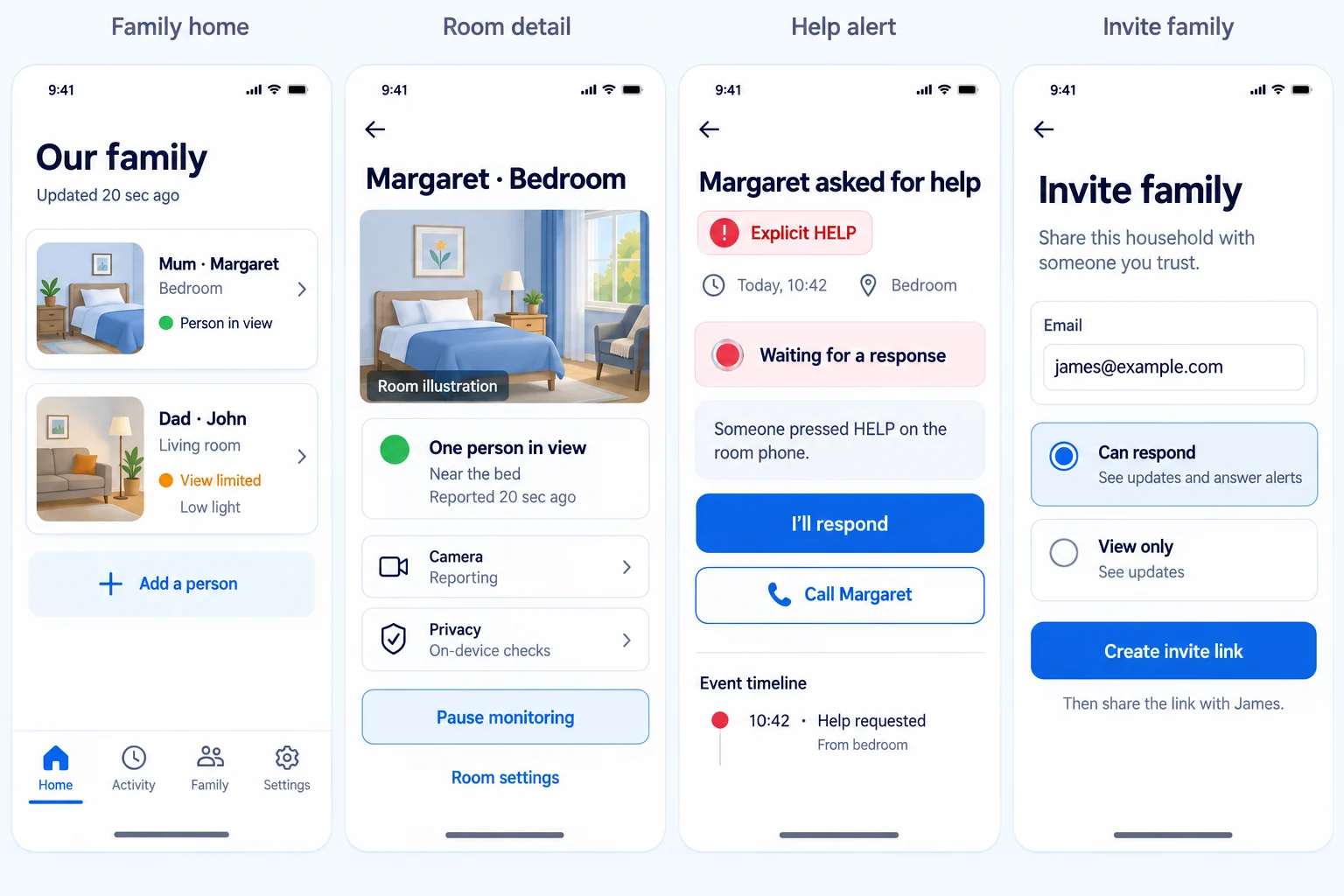
Proposed beta interface · fictional sample data
A simple start
One family app. One room phone. Three clear steps.
The family app handles household setup and updates. A separate Android phone stays in the room and performs the camera work. Camily keeps those responsibilities distinct so the experience is easier to understand and safer to operate.
Open Camily- 01
Add the person and room the family wants to support.
- 02
Discuss permission and record who agreed and how.
- 03
Connect a suitable Android room phone with a short-lived code.
Your family, in one place
Designed around the information families need next.
The proposed beta interface separates ordinary room updates, an explicit request for help, and household access—so a status is not mistaken for an emergency and every person knows what they can do.
Recent room facts
The planned family view shows when the room phone last reported, whether a person is in view, and whether monitoring is paused, limited, or not reporting.
A clear help workflow
The proposed workflow keeps a HELP request prominent so a family member can acknowledge it, then call or record the outcome when those actions are available.
Scoped family access
The planned access screens make responder and view-only roles understandable instead of exposing every household control to everyone.
Product direction
A calmer path from setup to everyday support.
These interface concepts show the experience being built across sign-in, permission, phone connection, room updates, help incidents, and family access.
Proposed interface direction with fictional sample data. Screens may change as the beta is implemented and verified.
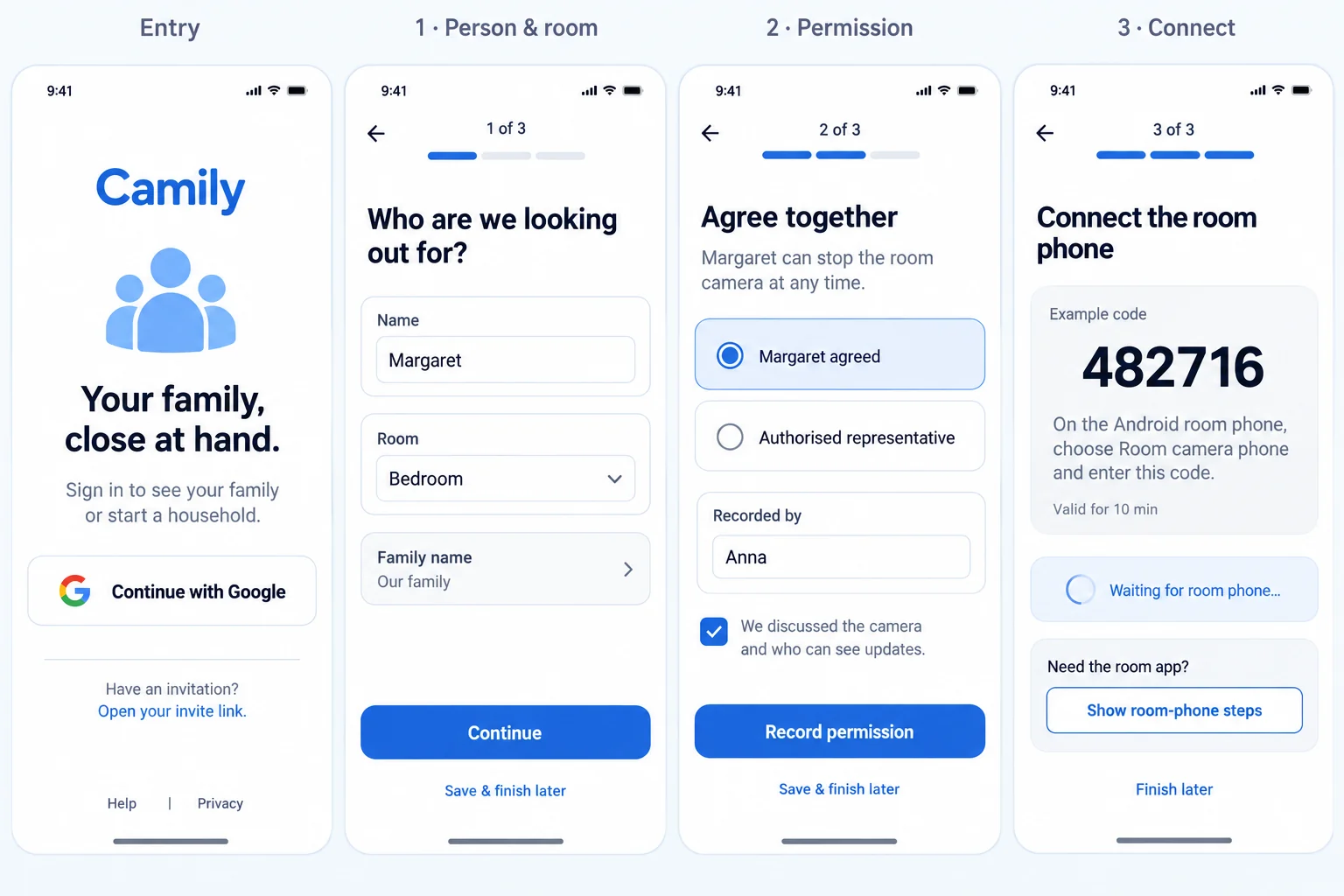
Sign in and set up
Create the household in manageable stages without turning installation into a barrier.
Family updates and help
Bring people, room facts, explicit help requests, and family access into one predictable app shell.
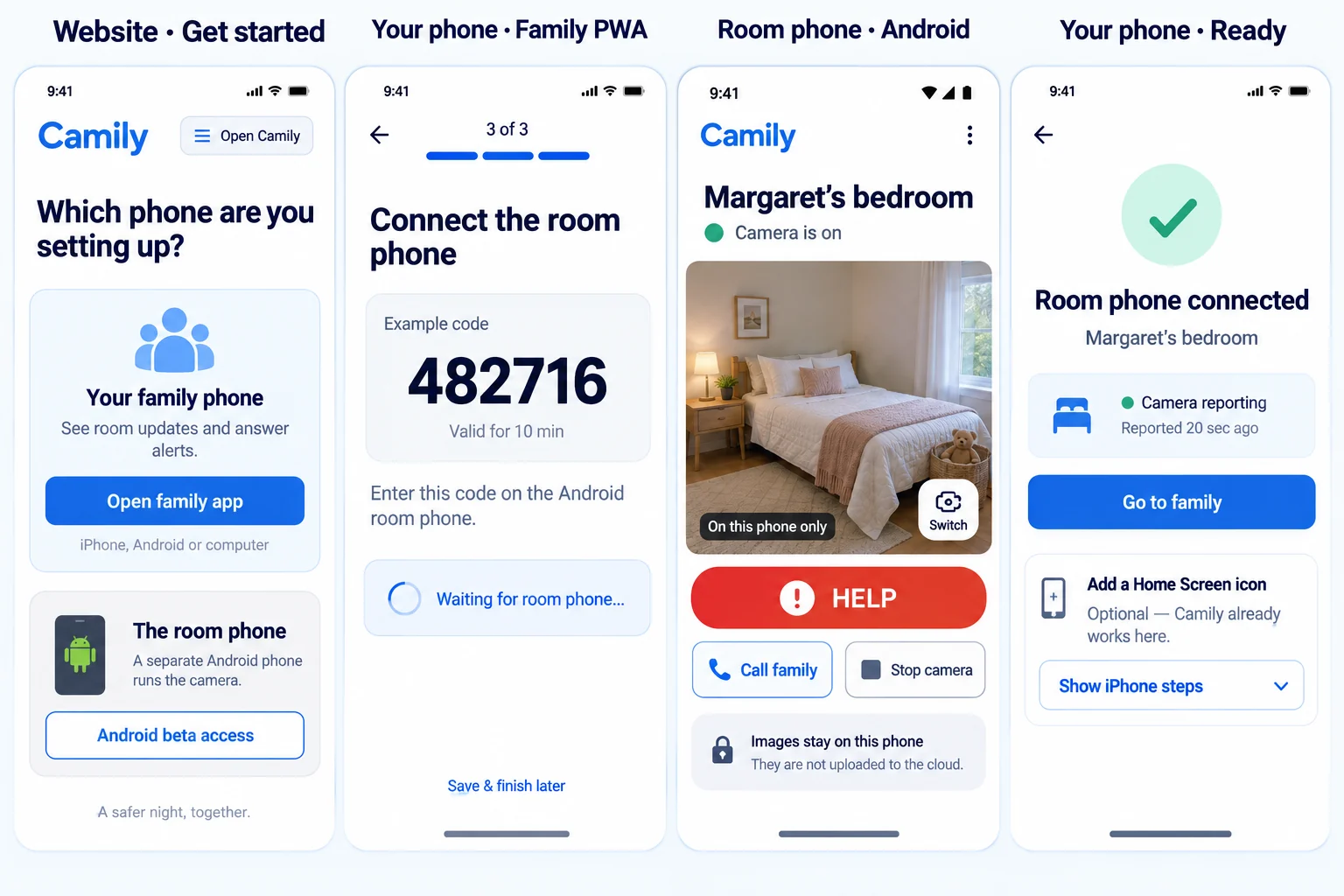
Connect the room phone
Keep the family phone, Android room phone, pairing state, and optional Home Screen shortcut clear and separate.
Ideal for
- Families supporting an older relative or another household member
- Households that want useful room updates without continuous remote viewing
- Family members coordinating who will respond to a help request
- Authorised care teams using a separate provider experience
Key outcomes
- See the latest reliable room report and monitoring state in one family view
- Give an explicit help request a clear family response
- Use a suitable spare Android phone instead of installing a dedicated server
- Keep household permission, family access, and room-device roles understandable
Current early-access foundations
- Installable family web app for iPhone, Android, tablet, and computer
- Separate Android room-phone beta using a suitable dedicated device
- On-device routine camera checks supporting possible fall-attention alerts
- Explicit HELP incidents with acknowledgement and follow-up actions
- Short-lived pairing codes for a dedicated Android room phone
- Separate authorised provider portal for participating care organisations
Proposed interface direction
- People-first home bringing room freshness, observations, and monitoring health together
- Clear room-detail views that distinguish connection, camera, and reporting states
- More readable owner, responder, and view-only family access controls
Security & governance
- Permission is part of setup and must be actively recorded
- Routine camera checks stay on the room phone by default in strict mode
- Routine frames are discarded; optional check-in stills are a separate household choice
- Family access and provider sharing are scoped separately
- Camily is a checking aid, not a medical device or emergency service
Stay close without turning support into continuous viewing
Camily is the next evolution of the product previously known as Safely. It is designed for families who want a recent, useful room update, support for possible fall alerts, and a clear way to respond when someone explicitly asks for help—without making a remote camera feed the centre of family life.
The family app works in a browser across iPhone, Android, tablets, and computers. A separate native Android beta runs on a suitable dedicated room phone. Families do not install or administer a server.
Each part has one clear job
The family app is where authorised people sign in, create a household, add people and rooms, record permission, check room reports, respond to help incidents, and manage family access. The Android room phone handles camera permission, its local preview, camera checks, HELP, and stopping the camera.
That separation matters. A successful connection does not automatically mean the camera is reporting. An acknowledged help request does not prove somebody is safe. Camily aims to show those states plainly rather than collapsing them into a reassuring but inaccurate green light.
Privacy and permission are product features
In strict mode, routine frames are analysed on the room phone and discarded by default. Optional blurred check-in stills are a separate household decision. Permission is actively recorded, and family or provider access must remain within the scope the household has authorised.
Early access, with honest limits
Camily can miss an event or raise attention when nothing is wrong. It does not replace personal contact, professional care, a medical device, or an emergency service. The room-phone experience is currently an Android beta, and the proposed interfaces shown here are product direction rather than released screenshots.
NeoSpark Solutions owns and develops Camily in Sydney, bringing product design, privacy boundaries, mobile engineering, and operational learning into one focused family experience.
Why teams choose Camily
We combine architecture-led thinking with AI acceleration to deliver products that feel premium, governed, and production-ready.
Want to discuss the product?
Connect with NeoSpark Solutions to explore a product partnership, destination experience, or a related idea.
Get In Touch